
Four fields · two tickboxes · Country preset to Australia · Currency preset to AUD · about 30 seconds · email confirmation required
Oshi Australia/Registration
Read off the real modal, not a memory of one
The Oshi sign-up box asks for four things and offers two tickboxes. Open it from an Australian connection and Country already reads Australia, Currency already reads AUD. Below is every control, what it does to your account, and which ones you are stuck with afterwards.
Here is the form itself, nothing redrawn or approximated — the modal that opens when you press SIGN UP on the Australian site.
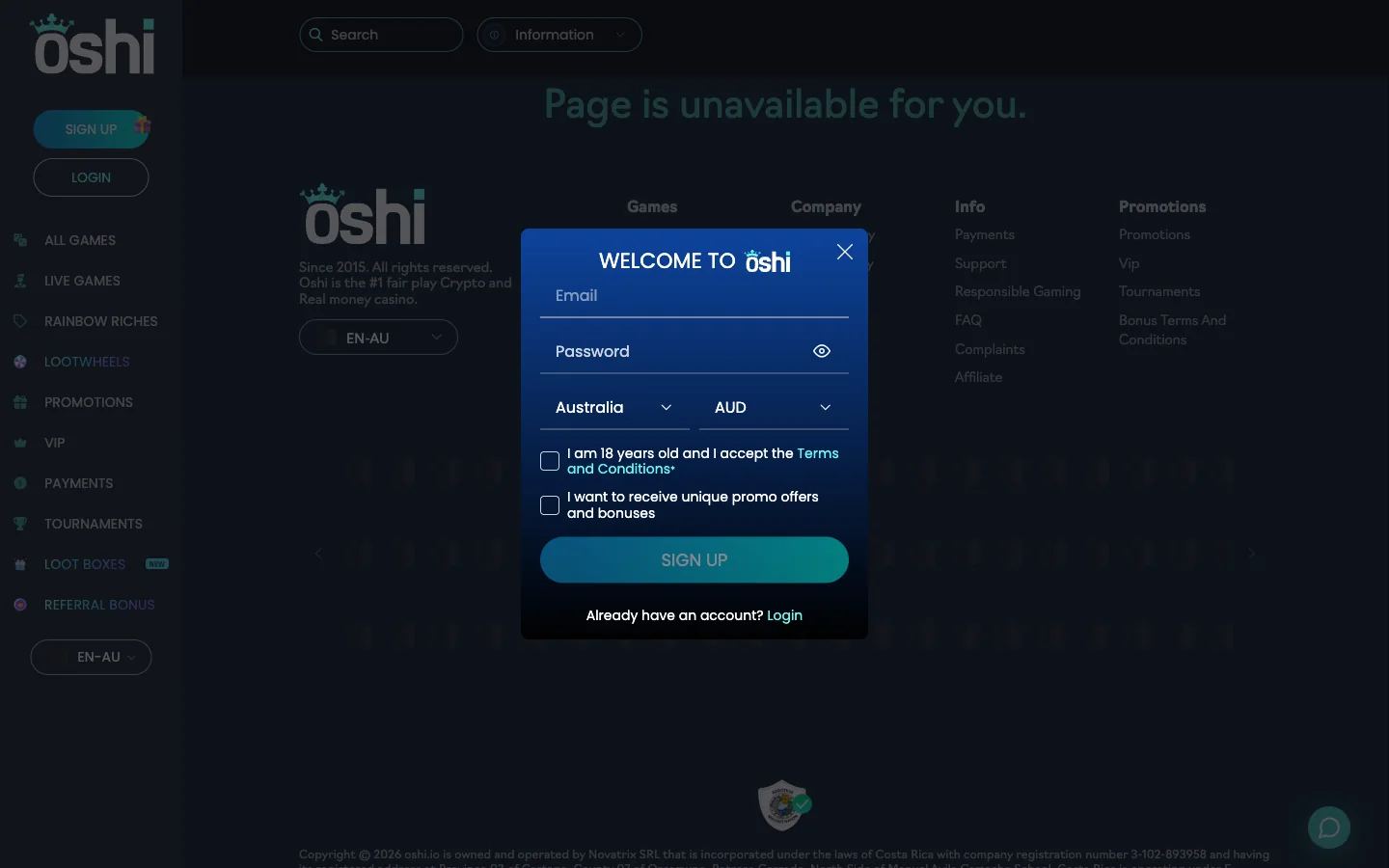
| Control | What it wants | Why it matters | Changeable later? |
|---|---|---|---|
| An address you can open in the next minute or two. | The confirmation link lands here, and so does every future password reset. | Treat it as permanent. Moving the address on a gambling account is a support conversation anywhere. | |
| Password | Your own, with an eye icon to unmask it as you type. | The only thing standing between someone else and your balance. | Yes, from inside the account, and the login modal carries a reset path. |
| Country | A dropdown that already reads Australia. | It decides which promotions page you see. Australia here is what pairs the account with the en-AU offers and codes. | Assume no, and leave it alone rather than test it. |
| Currency | A dropdown that already reads AUD. | Sets the denomination of your balance, your deposits and every published limit. | Yes. Oshi lets players add currencies and switch between them. |
| “I am 18 years old and I accept the Terms and Conditions” | A tick. The form will not submit without it. | Two statements in one box: your age, and your agreement to the operator's rules. Both are enforceable against you. | No. You declare it once and it stands for the life of the account. |
| “I want to receive unique promo offers and bonuses” | A tick, optional, your call entirely. | Marketing email. Leaving it blank costs you nothing on the welcome package, because those codes are published openly rather than mailed out. | Yes, in both directions — from the account or from any message you get. |
Oshi puts the whole thing at roughly thirty seconds plus an email confirmation, and that is honest. A longer walkthrough is not a better one when the form has four fields, so this is five steps and no padding.
That is genuinely all of it. No phone step, no document upload, no security-question page, no multi-screen wizard, whatever longer guides elsewhere suggest.
Of the six controls, this is the one worth a second of thought. Oshi holds balances in AUD alongside EUR, USD, CAD, NZD, NOK, PLN, ZAR, INR, RUB, CNY, BRL and crypto, and currencies can be added or switched after signing up.
Pick AUD and every number the operator publishes lines up with your bank statement. The A$30 qualifying deposit is A$30. The A$5 maximum bet during wagering is five dollars, not an approximation that drifts with the exchange rate. The A$300 ceiling on welcome free-spin winnings stays a figure you can hold in your head, and the A$15 to A$6,000 card range means what it reads.
Pick USD or EUR instead and nothing breaks — it just gets blurry. Every deposit becomes a conversion, every withdrawal becomes a second one, and the terms you are clearing are denominated in a currency your card is not.
The one case for choosing otherwise is a player who already funds everything from a wallet. For everyone paying by Australian debit card, AUD is the answer and the form has already given it to you.
Not on this form. The registration modal has no promo field, which trips up new players who go hunting for one and assume they missed a step.
The welcome code WELCOME100AUNZ goes in the cashier, on your first deposit of A$30 or more. Same for the codes on deposits two, three and four. The full set, the wagering arithmetic and the reload code live on the Oshi bonus codes page.
That tickbox is not decoration. Ticking it states in writing that you are eighteen and that the operator's terms bind you. Nobody checks a birthdate at the modal, which is exactly why the box carries weight later.
On location, the form answers the question itself. Australia sits in the country dropdown and AUD in the currency list, with an en-AU promotions page written behind them. Australians are plainly in scope.
The Interactive Gambling Act 2001 is the law people cite here, and it is routinely misread. Its obligations fall on operators — those supplying prohibited interactive gambling services to Australians — not on the individual placing a bet. An adult in Melbourne or Brisbane depositing at an offshore casino is not committing an offence under it.
What you give up is recourse. Oshi is run by Novatrix SRL under Costa Rican incorporation and a Tobique Gaming Commission licence, so a dispute is settled under that framework rather than by a regulator you can phone from Sydney. The licence and owner page sets out the detail.
Oshi's own FAQ is unusually relaxed on this, and quoting it beats summarising it: typically accounts are not verified when money is paid in or withdrawn. Verification is requested when fraud is suspected. Documents are usually approved right after upload, and the status of yours is visible in your profile.
In practice you can register, deposit and play without sending anyone a passport scan. Pleasant. The document checklists on longer guides describe a process Oshi does not routinely run at sign-up.
The catch is timing. A check skipped at deposit can still land at withdrawal, the worst moment for it — you have a balance, you want it out, and now a request sits in the way. Two habits remove the sting: register with details matching the card or wallet you will fund with, and upload the moment a check arrives, since approval is described as near-instant.
How verification interacts with cashing out, alongside the fee rules, sits on the Oshi withdrawals page.
Confirm the email, and the cashier is the next thing you touch. These are the entry rails on the operator's Australian payments page.
| Method | Minimum | Speed | Fee |
|---|---|---|---|
| Visa | A$15, up to A$6,000 | Instant | Free |
| Mastercard | A$15, up to A$6,000 | Instant | Free |
| Maestro | A$15, up to A$6,000 | Instant | Free |
| Bitcoin | From 0.0001 BTC | Instant | Free |
| Bitcoin Cash | From 0.001 BCH | Instant | Free |
| Ethereum | From 0.01 ETH | Instant | Free |
| Litecoin | From 0.01 LTC | Instant | Free |
| Ripple (XRP) | From 0.001 XRP | Instant | Free |
| Tether (USDT) | From 5 USDT | Instant | Free |
Now the Australian reality, the part nobody else prints. That page carries no PayID, no POLi, no BPAY and no Neosurf. Cards and crypto, and that is the list.
So a card it is, for most people. Be ready for it to bounce: CommBank, Westpac, NAB and ANZ all decline offshore gambling merchants some of the time, and that is your bank's decision rather than a fault in your new account. Buying crypto first is the usual workaround, and the payments and withdrawals page covers both routes.
Five things go wrong at this form, none of them mysterious once you know the cause.
| What you see | What is usually behind it | What to do |
|---|---|---|
| The verification email never arrives | Filtering. Casino mail lands in spam or promotions constantly, and a typo in the address produces the same silence. | Search the whole mailbox for the operator name, check junk, then re-read what you typed. |
| The password is rejected | A length or character rule the field enforces quietly. Pasted passwords also pick up stray spaces. | Use the eye icon to see what is really in the box, then try a longer mix of cases, digits and symbols. |
| The country dropdown will not stay on Australia | A VPN or proxy putting you somewhere else, or a region cached from an earlier visit. | Turn the VPN off, reload, and set the dropdown by hand before submitting. |
| An account already exists on that email | You registered before, possibly on a different mirror, and forgot. | Do not open a second one. Reset the password instead — the Oshi login page covers it. |
| Promotional email you did not want | The optional tickbox left ticked while you concentrated on the mandatory one above it. | Untick it, or unsubscribe later. It has no bearing on bonus eligibility. |
Anything that happens once the account exists — sign-in loops, a mirror that stopped resolving, a forgotten password — belongs on the login side rather than here.
The operator says about thirty seconds, and with four fields that is believable. Add however long your email takes to deliver the confirmation link, because the account is not finished until you click it.
Four things only: email, password, country, currency. Underneath sit two tickboxes — the mandatory age and terms declaration, and an optional opt-in for promotional messages.
Not at this stage. The operator states that accounts are typically not verified when money moves in or out, with checks requested where fraud is suspected. Nothing is asked of you on the sign-up modal itself.
The dropdown offers Australia, the currency list offers AUD, and there is a promotions page written for en-AU accounts. Australians are clearly catered for. What you do not get is an Australian regulator to appeal to if something goes wrong.
The Interactive Gambling Act 2001 directs its obligations at operators supplying services into Australia, not at the person placing the bet. An adult here is not breaking that law by registering. This is general information rather than legal advice.
In the cashier, attached to your first deposit of A$30 or more. The registration modal has no promo field at all, so there is nothing to miss while you are creating the account.
AUD, unless you fund exclusively from a crypto wallet. It keeps the A$30 minimum, the A$5 wagering bet cap and the card range readable, and it spares you a conversion on the way in and another on the way out.
Yes. Oshi allows players to add currencies to an account and switch between them, so a wrong pick in the dropdown is not permanent damage.
Yes, there is a play-for-fun mode on the titles, so you can browse without registering. Real money, bonus codes and the welcome package all need a funded account. The games and studios page describes how the lobby is organised.
Email, password, two dropdowns that are already right, one tickbox. Confirm the message Oshi sends and the cashier is open.
Open an Oshi account now